Advanced example. RapidTablet is Coulee Tech's conversation assistant, built on RapidDashboard. The clinic, companies and people here are made up, and the tablet below runs in your browser with sample data. ← Built with RapidDashboard
Remi is taking notes

Put it on the counter. Remi takes the notes.

RapidTablet sits where conversations happen: a clinic’s front desk, a trade show booth, a kitchen table, the monthly numbers meeting. Remi writes the notes as people talk, catches what changed and files it to RapidDashboard.

Try the tablet →
Scenarios to try
4
Poster to notes
1tap
Remi checks in every
8s
One minute, no sound needed. A patient check-in, then the same tablet in three more places. Download
Try it

Pick a place. The tablet plays that day.

This is the tablet’s own app with a scripted conversation for each scenario. It starts on the poster; tap it, open the first conversation and watch the notes arrive. Nothing is recorded or sent.

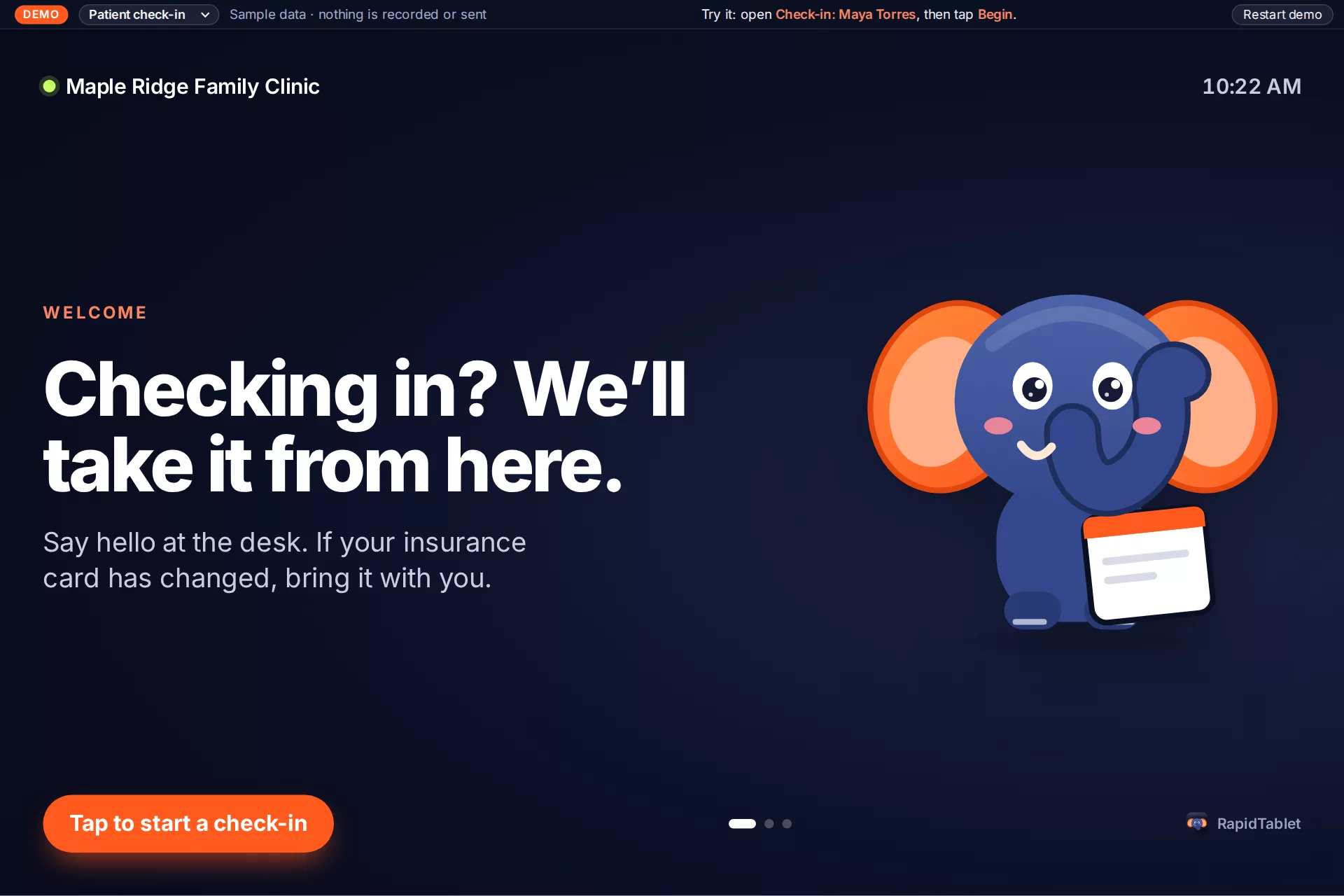
RapidTablet's poster screen at the clinic front desk
The same screens run on the tablet, and in a phone or laptop browser through RapidDashboard. Open full screen ↗
Scenarios

Same tablet. Different table.

The app doesn’t change: a briefing before, notes and suggestions during, a summary and approved updates after. What changes is who’s talking and where the notes go in the Rapid app family.

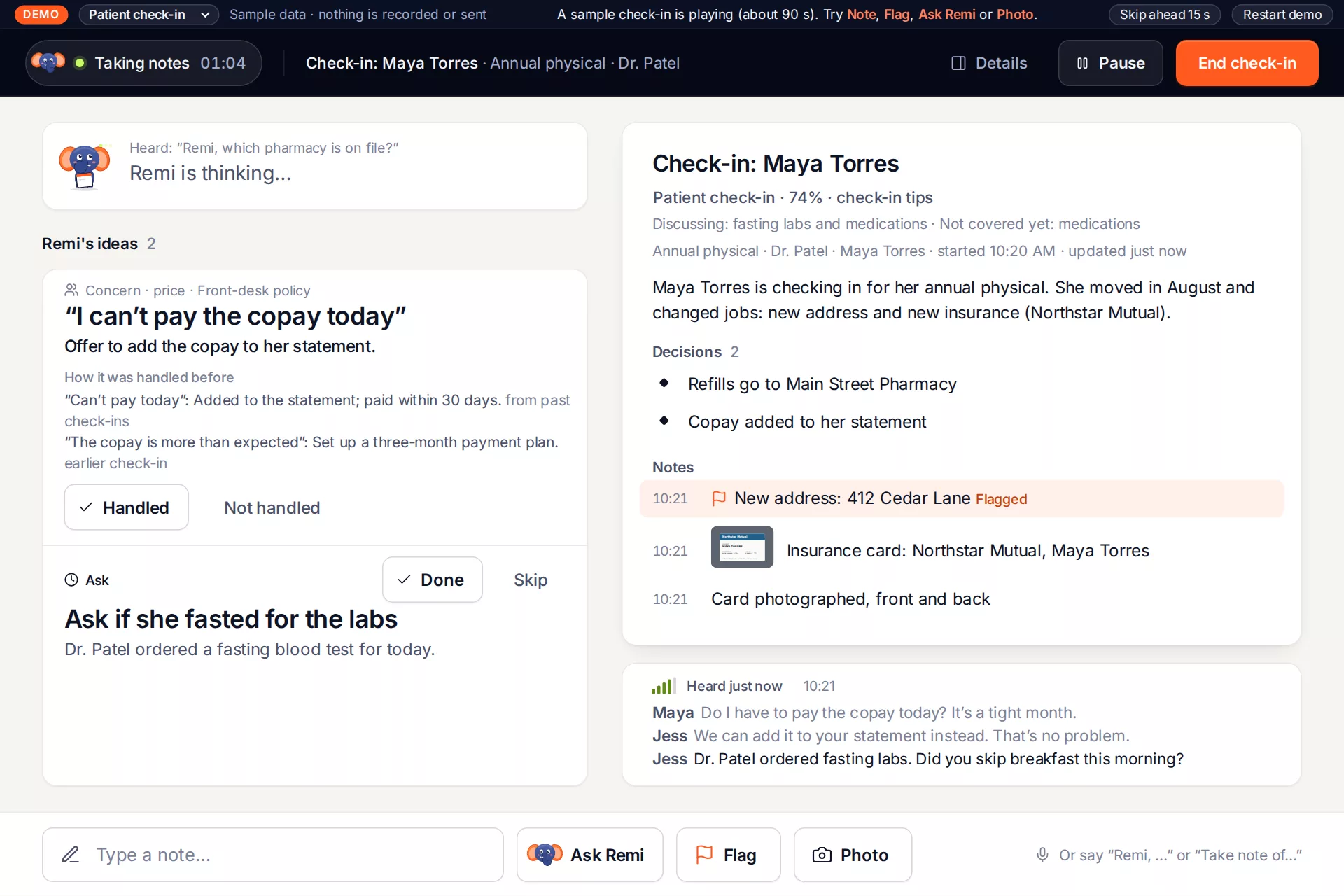
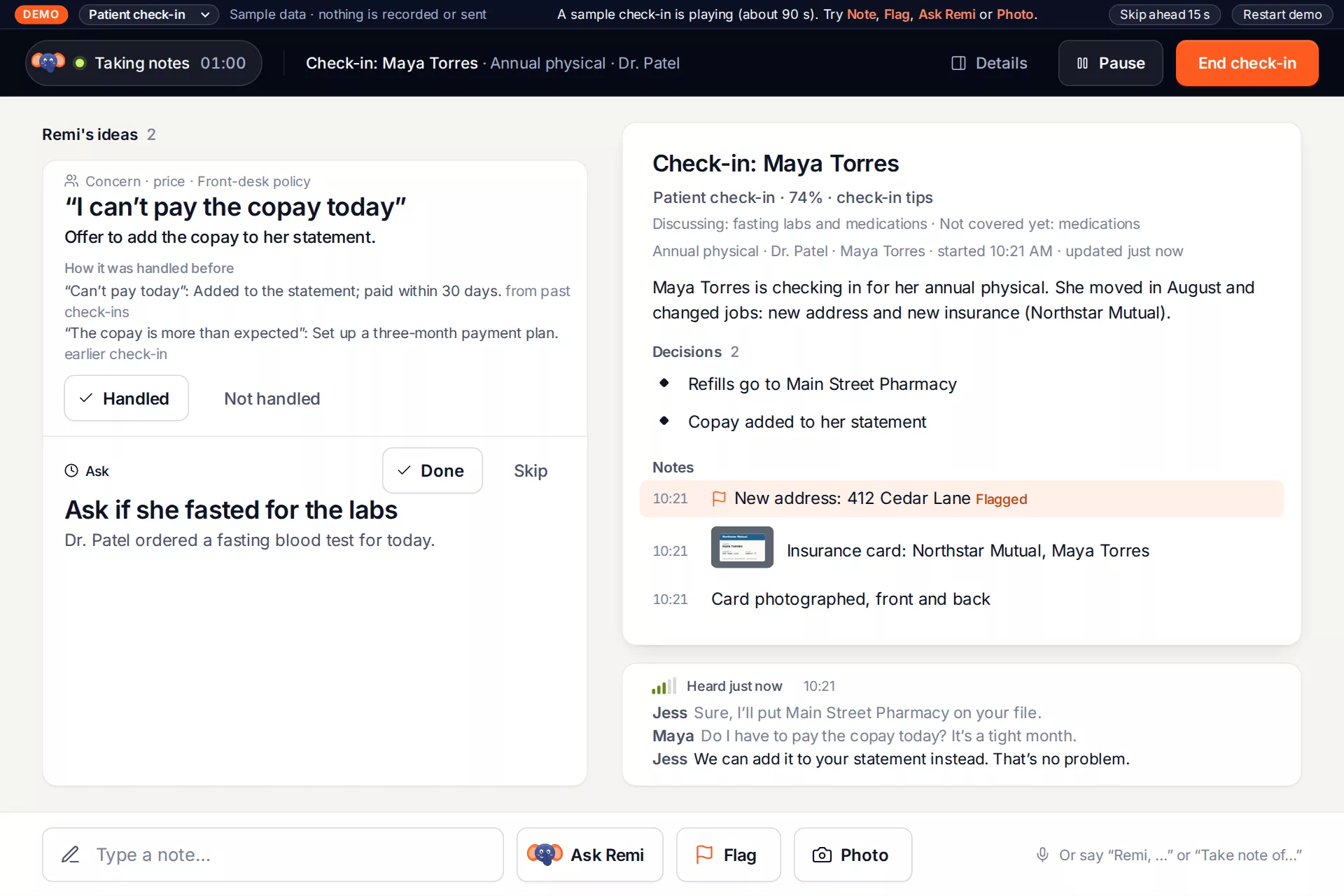
Remi's ideas during a patient check-in: a copay concern with the front-desk policy, and a reminder to ask about fasting labs
Clinic front desk

Patient check-in

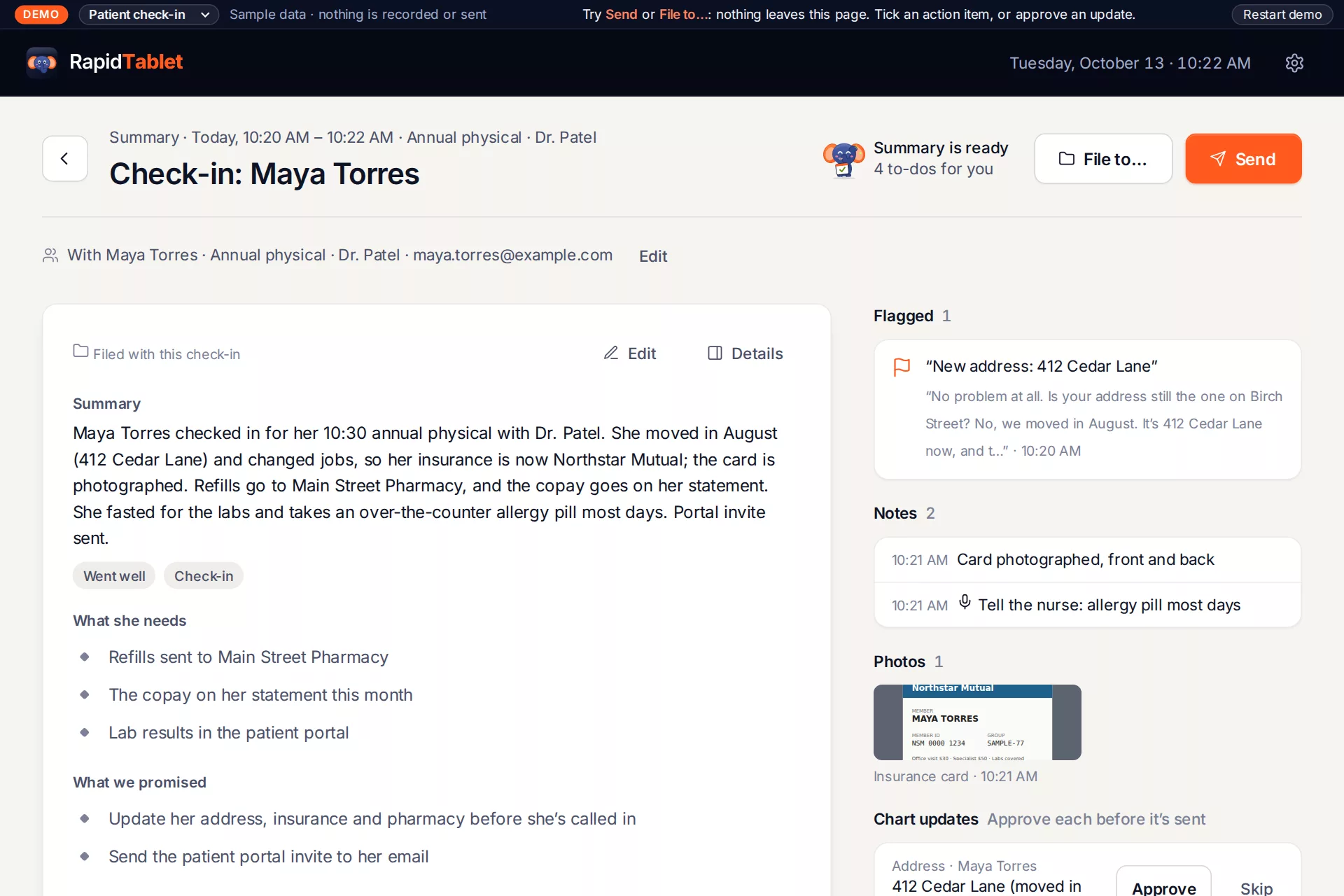
The desk talks to the patient, not the keyboard. Remi catches the new address, the new insurance card and the pharmacy change, and reminds the desk what to ask.

Before
What may have changed: a returned claim, a returned letter
After
A check-in summary and chart updates the desk approves one by one
Poster between patients · RapidKiosk
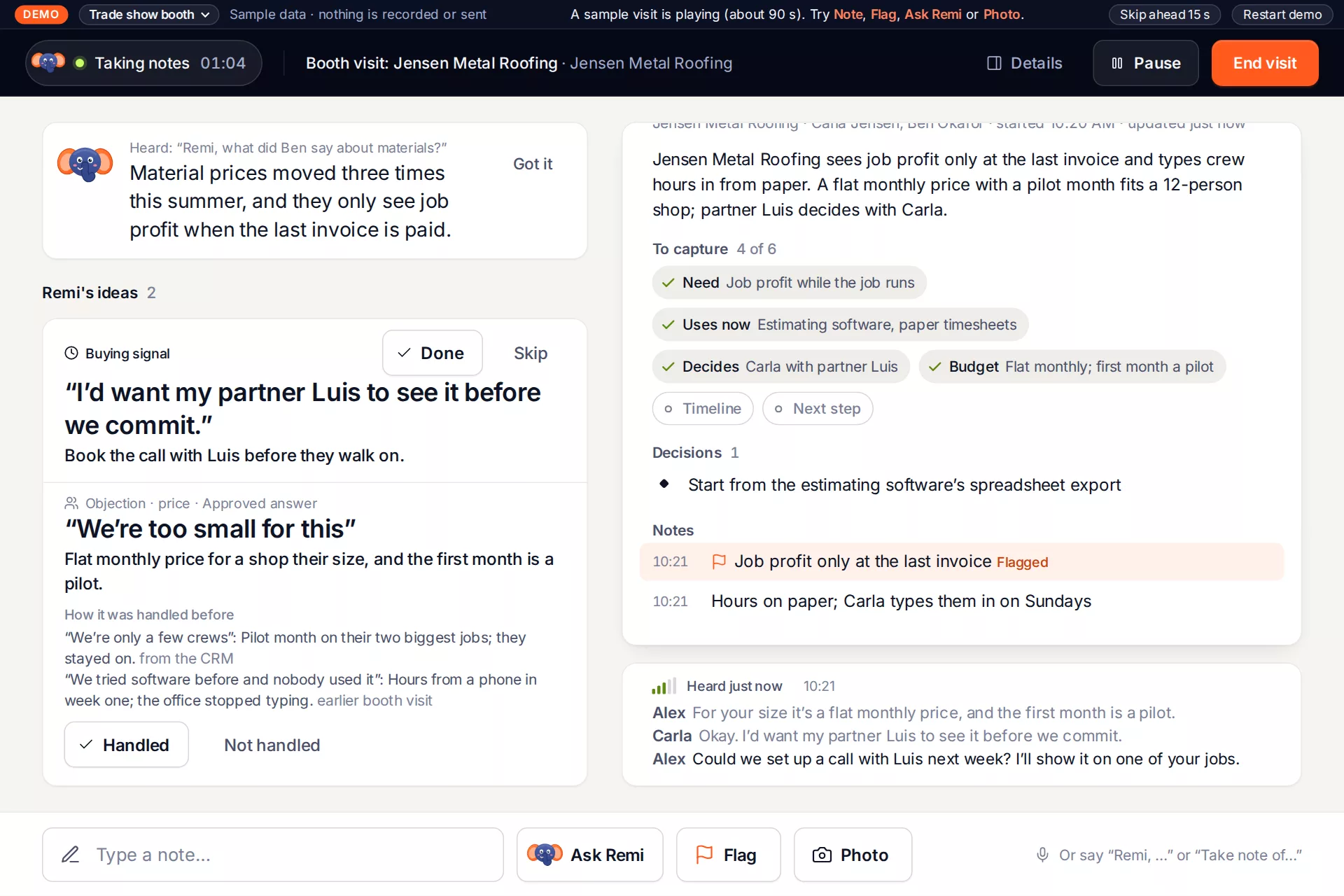
A buying signal card at a trade show booth: the visitor wants her partner to see it
Trade show booth

Booked booth visits

Visitors book 20 minutes from a RapidTradeshow recon page, so the briefing is ready when they walk up. Remi spots the buying signal and fills in who decides.

Before
The visitor’s company from the recon page
After
The lead, the next step and a card photo, ready for RapidCRM
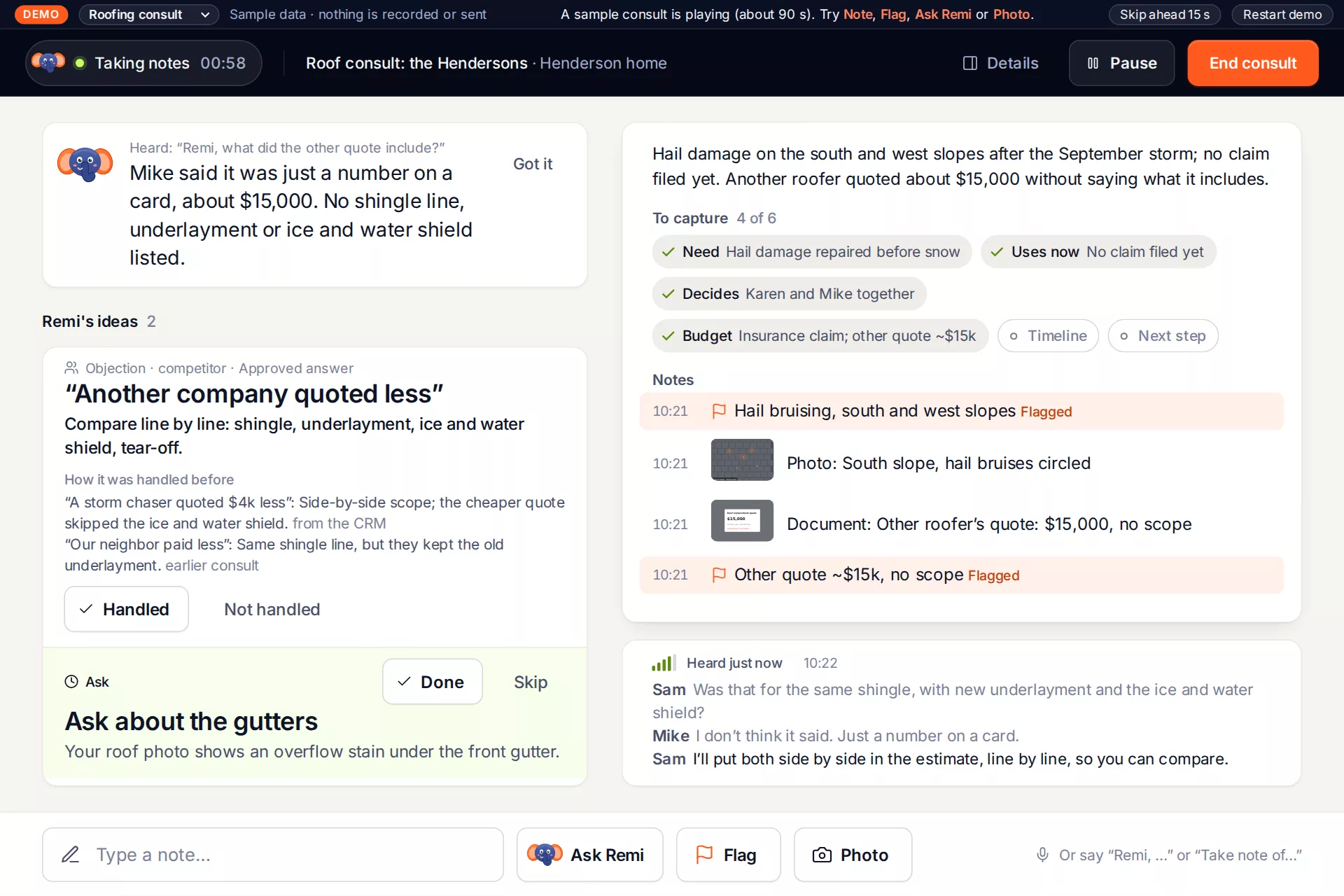
A roofing consult: Remi answers what the other roofer's quote included
Kitchen table

Roofing consult

The homeowners already saw their roof measured on the RapidRoofing page. The estimator starts there; Remi keeps the claim, the other quote and the deadline straight.

Before
The online estimate: squares, pitch, a price range
After
Who calls the insurer, when the estimate goes out, the slot on hold
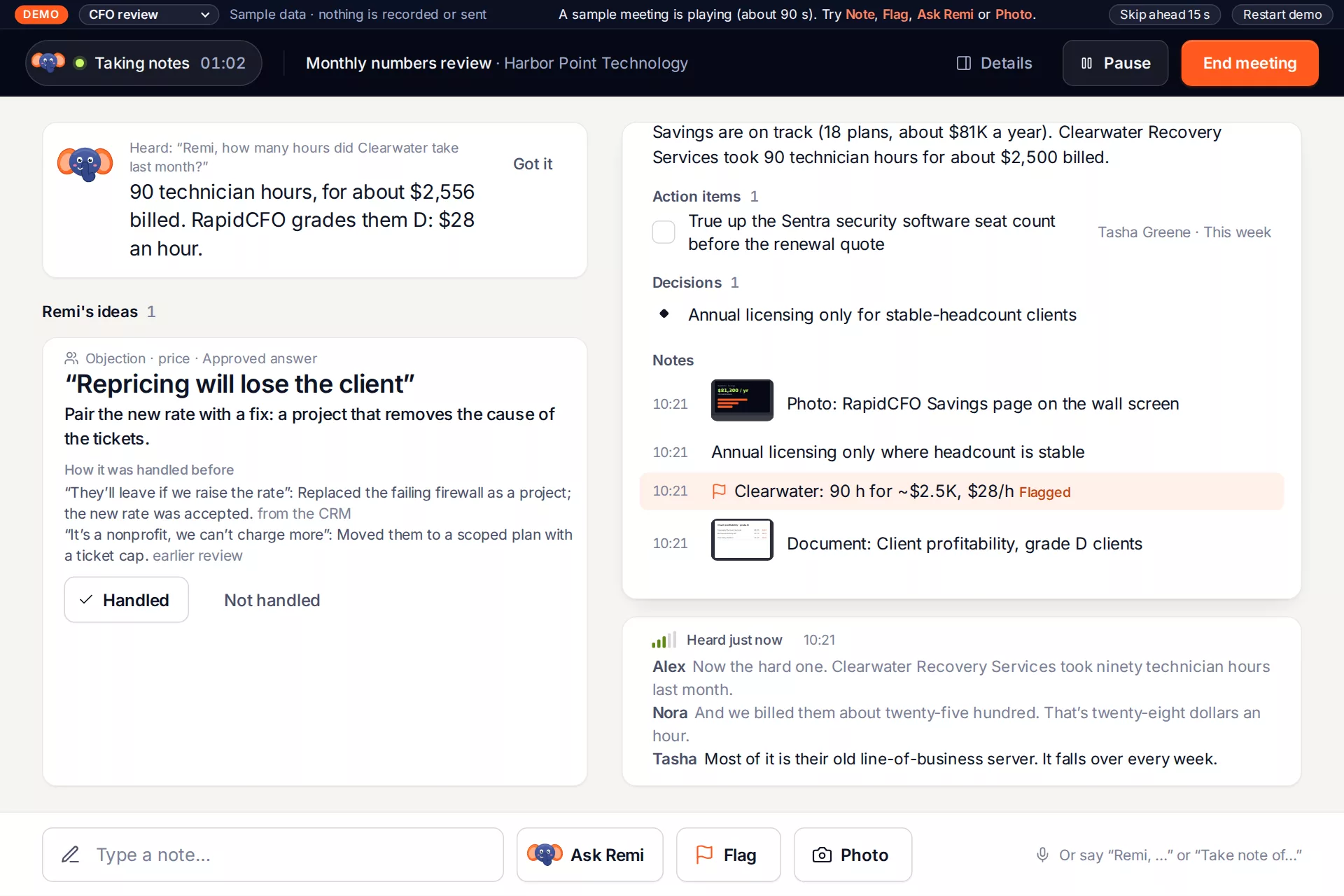
The monthly CFO review: Remi answers how many hours a client took last month
Conference room

Monthly CFO review

RapidCFO’s savings and client grades are on the wall screen. Remi keeps the decisions and puts a name and a date on every action item.

Before
This month’s savings plans and the grade D clients
After
Decisions, owners and dates, next to the RapidCFO pages they came from
Pairs with RapidCFO →

More places a tablet like this earns its spot

Ideas, not built scenarios: anywhere two people talk across a counter or a table and someone has to type it up afterwards.

Service desk at a car dealershipFront office at a schoolVet clinic check-inProperty walk-throughs Job interviews for HRJob-site safety talksRental counter pickups and returnsBank or credit union desk
A check-in, start to finish

Five screens, in the order the desk needs them.

Each screen is built to be read at arm’s length on a counter, with buttons big enough to tap without looking away from the person.

Between patients · Poster

A poster until someone walks up

The tablet on the counter welcomes people, says what’s on this month and points to the patient portal. One tap wakes it.

  • The clinic’s own welcome, hours and reminders
  • One tap to the day’s check-ins
The poster screen: Checking in? We'll take it from here.
Before · Briefing

Know what may have changed

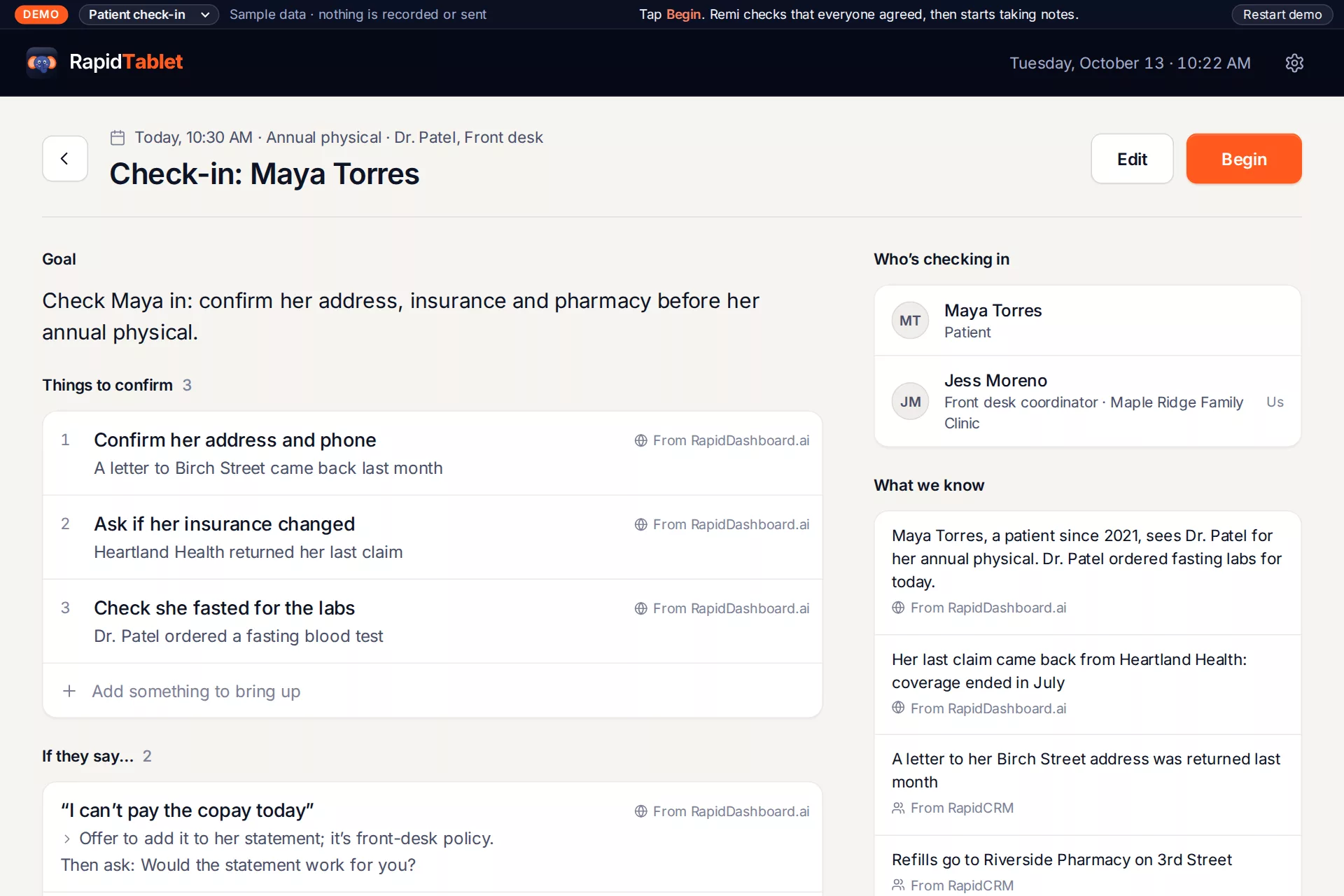
Every booked visit comes with a briefing: who’s coming, what came back since last time and what to confirm.

  • A returned claim, a returned letter, the pharmacy on file
  • What to say if the copay comes up
Briefing for Maya Torres's check-in
During · Check-in

Notes that write themselves

The screen shows Remi is listening and what it heard. Every few seconds it decides whether something is worth a note, or worth suggesting the desk asks next.

  • Suggestions in big type, readable from the chair
  • Note, Flag and Photo for the insurance card
  • Never locks or times out mid-conversation
Check-in screen with live notes and Remi's ideas
After · Summary

Done before she sits down

When the check-in ends, Remi writes the summary, decisions and to-dos. Updates to the record wait until the desk approves each one; your edit always beats the AI’s text.

  • Address, insurance and pharmacy updates, one approval each
  • File it, or send it on
Check-in summary with what she needs and what was promised
After · To-dos

Nothing depends on memory

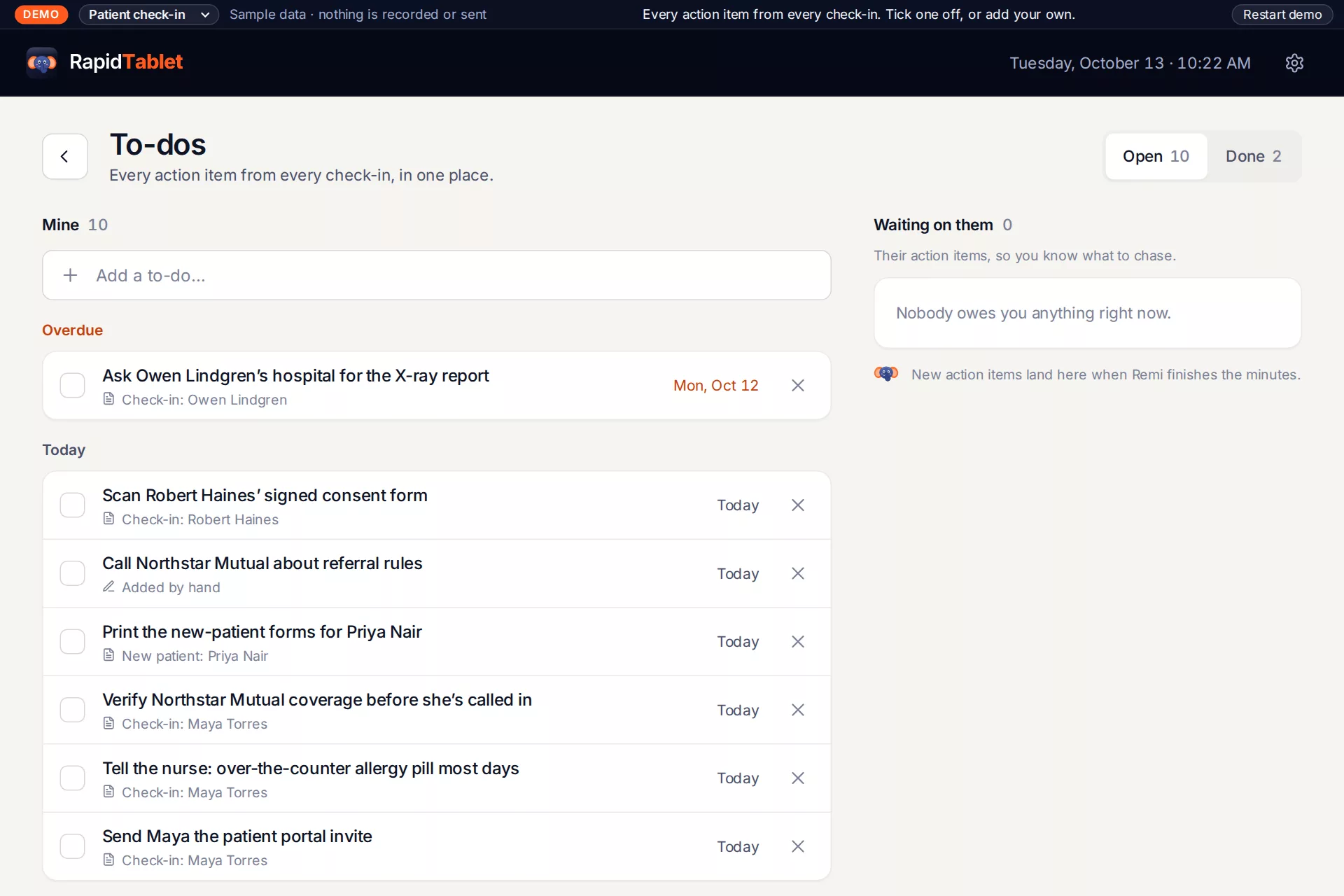
Action items become to-dos with owners and dates, on the tablet and in RapidDashboard.

  • Check the new coverage, tell the nurse, send the portal invite
  • Checked off from any screen
To-dos screen
How Remi behaves

A note-taker, not a recorder.

People talk differently in front of a recorder. Remi was designed to feel like a capable assistant at the counter.

Shows it’s hearing

A live dot and the latest line Remi caught are always on screen. If the mic stops, the screen says so at once.

You can ask it

“Which pharmacy is on file?” Ask Remi mid-conversation and the answer comes from what was said and what’s on file, not a guess.

Asks before it acts

Consent is confirmed and recorded at the start of each conversation. Nothing reaches another system until you approve it.

Your words win

Anything you type or edit beats the AI’s version, on the tablet, in the browser and in RapidDashboard.

Offline and private

Built for front desks, show halls and job sites.

Works offline, repairs itself

No signal? Keep talking.

The tablet records, writes notes, takes photos and keeps the briefing without internet. Five rules make sure nothing is lost or doubled when the connection comes back.

  1. Every record gets its own ID where it’s created, so a retry can never make a duplicate.
  2. Every sender keeps an outbox and sends oldest first, backing off when the network is busy.
  3. Every receiver keeps a cursor, so whoever was away picks up exactly where it left off.
  4. Audio and photos are checked by fingerprint (SHA-256) before the tablet deletes its copy.
  5. Both sides compare notes on reconnect and daily, so a lost message is found and re-sent.
Private by design

Every conversation has one home.

RapidDashboard owns the content for each organization. The tablet keeps only what it captured and hasn’t had confirmed yet.

AudioVoice-tuned Opus, 16 kbps, ~6 MB an hour
PairingOne-time code, device key sealed in the tablet’s TPM
Lost tabletRevoked from RapidDashboard in one click
ConsentRecorded with every conversation
OrganizationsEvery record scoped to one org
Audio retentionSet per organization, hard delete on request
How it fits

RapidDashboard is the hub. The Rapid apps plug in.

The tablet and the browser portal capture conversations. RapidDashboard stores them for the organization. RapidCRM, and any other software, reads the notes and sends the calendar back through one public Integration API.

RapidTablet On the counter, works offline DEVICE API Browser portal Same screens on a phone or laptop PORTAL API RapidDashboard The hub for each organization Audio, notes, photos, summaries, to-dos, briefings, consent, devices and people RapidCRMCustomers, leads, the calendar RapidTradeshowBooth visits booked by QR code RapidRoofingOnline estimates to start from RapidCFOSavings and client grades Other softwareA practice system, an ERP: HTTPS INTEGRATION API conversations up, calendar down
Straight answers

Frequently asked questions

What does the tablet do between conversations?

It can be a poster: a welcome, this month’s hours and reminders, a booth’s offer. That’s the RapidKiosk side of the same device. One tap brings back the day’s conversations, and the demo above starts on the poster so you can see both.

Is the patient check-in ready for real patients?

It’s a scenario with made-up patients, there to show the idea. Before a clinic uses RapidTablet with real patient information, it needs its own HIPAA review, a business associate agreement and a connection to the practice’s own system for the chart updates. Talk to us before you plan on it.

Does it record the whole conversation?

It records voice audio so Remi can write the notes, after the people there agree. The audio is tuned for speech, not music, which keeps an hour to about 6 MB. Each organization decides how long audio is kept, and it can be deleted on request.

Where does the AI run?

The tablet sends short pieces of audio to a speech model to be written down, and Remi’s suggestions and summaries come from a language model working only on what was said and on the organization’s own data in RapidDashboard. Text that comes from a conversation is treated as data, never as instructions to the AI.

What if there’s no internet?

The conversation goes on. The tablet keeps recording audio, your own notes, flags and photos, and the briefing was already downloaded. Remi’s notes catch up and everything uploads by itself when the connection is back, without duplicates.

Which systems does it work with?

Anything that can make HTTPS calls, through RapidDashboard’s Integration API: it reads the notes and to-dos and sends the calendar back. RapidCRM is being connected first. RapidTradeshow, RapidRoofing and RapidCFO are other RapidDashboard builds; the scenarios show where each would plug in through the same API.

Do I need the tablet?

No. The same screens run in a phone or laptop browser through RapidDashboard, recording with the browser’s microphone. The tablet adds a better microphone, a camera for cards and documents, and a screen you can leave on the counter.

Who are Maya, Jess, Carla and the others?

They’re made up for this demo, along with Maple Ridge Family Clinic, Jensen Metal Roofing, Bluff Country Roofing and the rest. Harbor Point Technology is the same fictional company as the RapidCFO example. Every conversation is a scripted sample, played back by the app’s own screens.

Keep your eyes on people. Remi has the notes.

RapidTablet is built on RapidDashboard, so every conversation lands next to the rest of your organization’s data.

Schedule a demo →

Send the one-minute video, or a link to this page with the video at the top.