






RapidBackup · image backup and disaster recovery
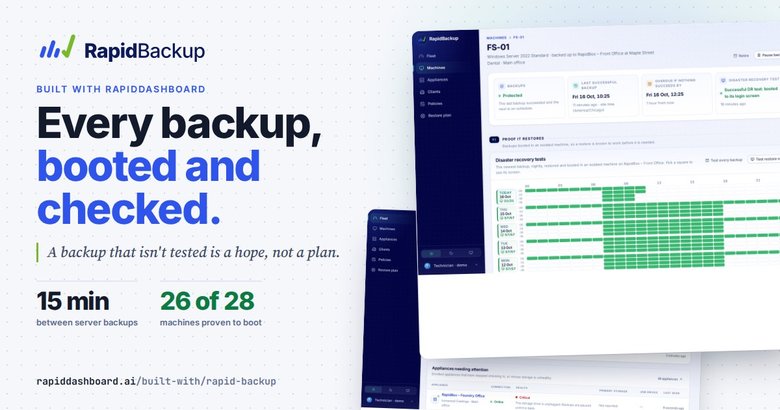
Every backup, booted and checked.
A backup that isn't tested is a hope, not a plan.
RapidBackup images every disk of every server and PC an IT provider protects, to a RapidBox on site. Then it boots each backup in an isolated virtual machine with no network, takes a screenshot and reads the screen. You see the login screen it reached, not a green tick.
 Real screen · fictional data
The real app · fictional data
The RapidBackup portal, as a technician sees it
These are screenshots of the real RapidBackup, running on a copy loaded with a fictional IT provider: Harbor Point Technology protects 28 machines across seven clients and seven RapidBoxes. What you see here is what you get. Pick a screen, then tap the numbers.

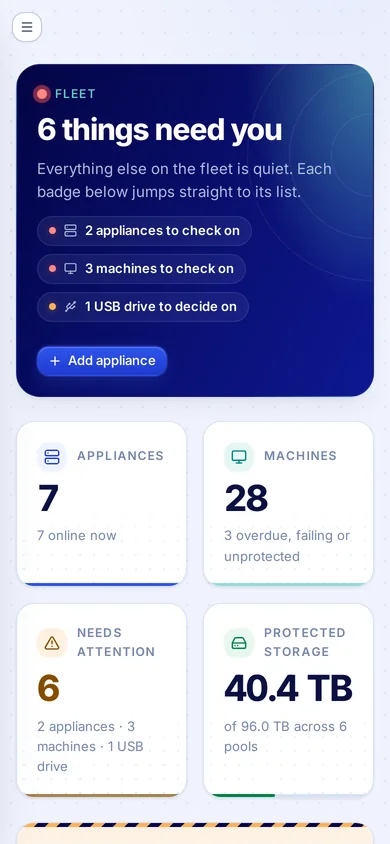
Fleet
The first screen of the day: how many things need a person, each one a badge that jumps straight to its list, then the fleet in four numbers.
- 1The verdict. "6 things need you", or "Nothing needs you" on a quiet day.
- 2Badges. Appliances, machines and USB drives to check, one tap to each list.
- 3Needs attention. Overdue, failing or unprotected, counted across every client.
- 4USB drives. A drive nobody has given a role is only read, never written.
- 5Appliances. Worst first: this RapidBox's storage drive is unplugged, so backups are paused.

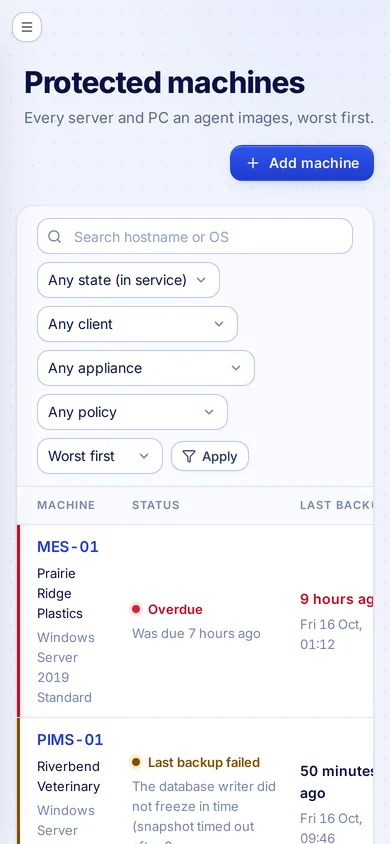
Machines
Every machine an agent images, worst first, with its last backup, its last boot test, its size and three weeks of history.
- 1Status. Overdue, last backup failed, protected, backing up now.
- 2Last DR test. What the boot test reached: login, unlock, still busy, or did not boot.
- 3Did not boot. A backup that exists but would not start is flagged, not hidden.
- 4Three weeks. One dot per day: everything happened, some missed, or none.
- 5Filters. By state, client, appliance and policy.

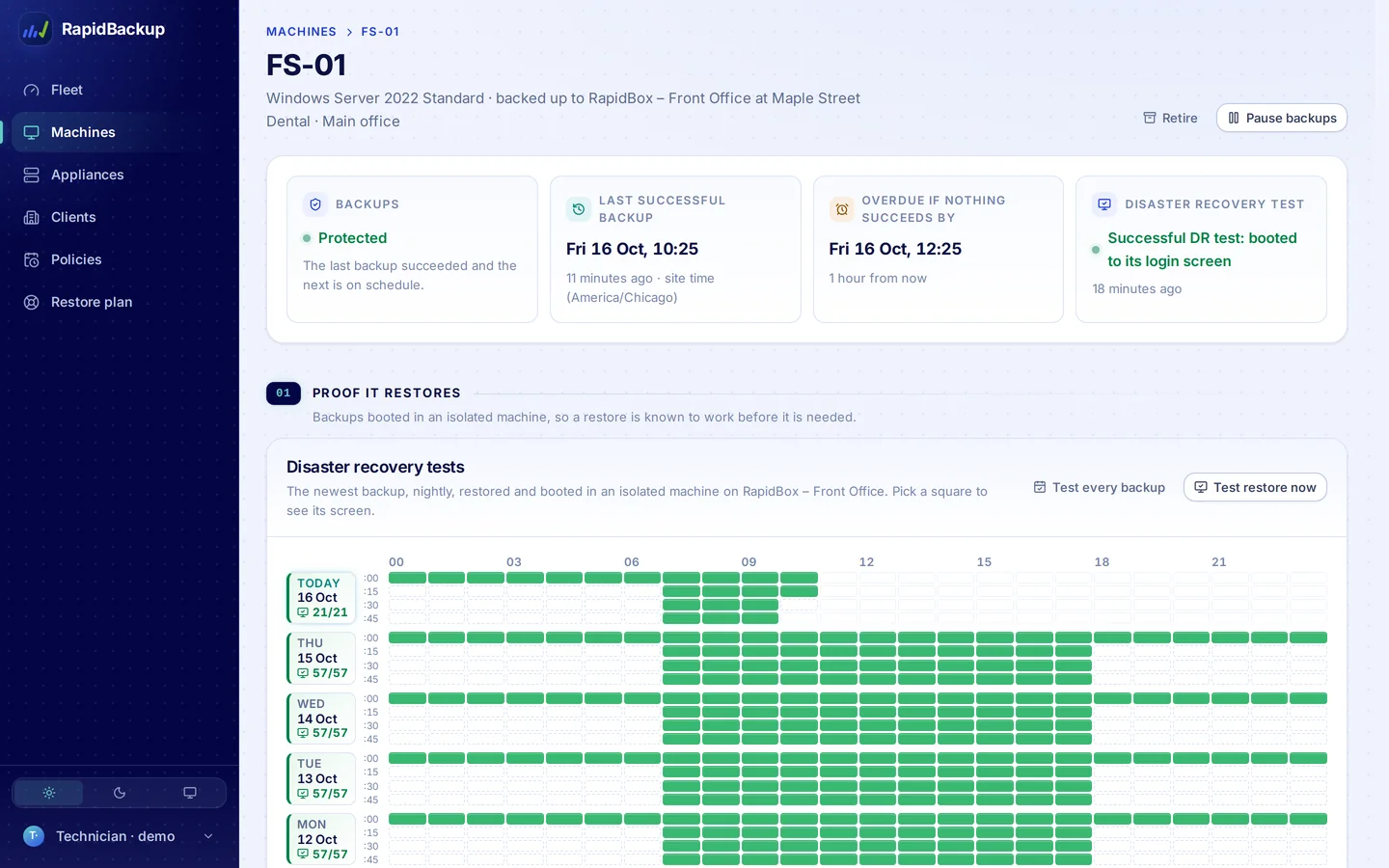
Machine
One machine: is it protected, when the last backup was, when it becomes overdue, and the last disaster recovery test. Below, a week of boot tests, one square per 15-minute backup.
- 1Backups. Protected: the last backup worked and the next is on schedule.
- 2Overdue if. The time it turns red if nothing succeeds.
- 3DR test. The last boot test, in words.
- 4The grid. A row per day, a square per backup. Pick one to see its screen.
- 5Test restore now. Boot the newest backup on demand.
- 6Test every backup. Boot-test each backup, not only nightly.

Boot test
Pick a square and you see the screen the restored backup reached in an isolated machine with no network, with when it was taken and tested. (The screen in this copy is an illustrative stand-in.)
- 1The screen. The booted backup reached its login screen. Kept as proof.
- 2Verdict. Successful DR test: restored and reached its login screen.
- 3When. Tested nightly, or after every backup, or on demand.

Recovery points
Every recovery point on the appliance: when it was taken, what changed, whether it was readable, whether it booted, and how much it stores.
- 1Legend. Booted to login, to disk unlock, still busy, failed, not tested.
- 2Every point. The entire machine: every disk, partitions and all.
- 3Checks. Readable when it was made, then the boot test result.
- 4Stored. Only the changed blocks are kept for each point.

Appliances
Every RapidBox, worst first: online or not, healthy or not, how full its storage is, and any USB drives plugged in.
- 1Critical. Storage drive unplugged: backups are paused until it is back.
- 2Warning. A pool that is 87% full shows before it becomes a problem.
- 3New USB drive. Plugged in, unclassified, waiting for someone to decide.
- 4Filters. By connection, health, enrollment, kind and client.

A box in trouble
A RapidBox whose storage drive was unplugged: it says so in plain words, pauses backups rather than writing to an empty mount, and resumes within a minute of the drive coming back.
- 1Backups are paused. Plain words for what happened and what to do.
- 2Storage health. Critical: a pool is missing.
- 3The pool. Unavailable and detached, encrypted at rest.
- 4Test connection. Sends the box a ping; the answer comes back on its next check-in.

A healthy box
A healthy RapidBox: online, storage pools with room, and the USB drives plugged into it. A new drive waits for a decision.
- 1A decision. A new USB drive is only read until someone enrols it or leaves it alone.
- 2Desired state. The box fetches and applies each new version on its next check-in.
- 3Encrypted pool. Where the backups live, and how full it is.
- 4Online. Last check-in seconds ago.

Policies
How often each kind of machine is backed up and how long each point is kept. Change a policy and every machine on it follows.
- 1Schedule. Every 15 minutes in business hours, hourly otherwise.
- 2Retention. 24 hours of every point, then hourly, daily, weekly and monthly.
- 3Reaches back. How far back you can rewind: a year for servers.
- 4Boot-tested nightly. Every policy includes the nightly boot test.

Restore plan
The restore plan is honest about today: every machine has a copy on its RapidBox, and the USB and cloud copies are designed, not built yet. The app says so in its own words.
- 1No off-site copy yet. The gap, in plain words.
- 2Readiness. Four checks, counted across every machine.
- 3Off-site. 0 of 28 today: the copies that close the gap are on the plan.
- 4Built or designed. Each copy is labelled: built, or designed and not built yet.

Clients
The organisations whose machines RapidBackup protects, with their sites and appliances.
- 1Client. Each client with its status and contact role.
- 2Sites and appliances. Where its RapidBoxes are.
Real screens from RapidBackup, on a copy loaded with a fictional IT provider. The boot-test screens inside the grid are illustrative stand-ins; on a RapidBox each one is the screenshot of the booted backup.
How a DR test works
From recovery point to verdict, with nothing on the network
The same five steps run nightly, after every backup, or when a technician clicks Test restore now.
Mount the point
A read-only copy of the recovery point. The backup itself is never changed.
Isolated VM
A virtual machine on the RapidBox with no network attached.
Boot it
Start the machine from its backup and wait for the screen to settle.
Screenshot and read
Keep the screenshot and read the text on it.
Record a verdict
Saved with the recovery point, shown on the machine's DR grid.
How it's built
An agent, a box, a test VM and a fleet view
The agent images every disk
Linux servers today, with whole-disk images, and a newer Windows engine that has passed its first boot test. Installed from a per-machine keyed installer. Changed-block tracking means each incremental reads only what changed. Encrypted disks stay encrypted.
The RapidBox keeps the points
On its own disks or an enrolled USB drive. Each point is checked readable as it is made. If the storage drive is unplugged, backups pause rather than write to an empty mount.
The box boot-tests them
An isolated virtual machine with no network boots the backup, screenshots it and reads the screen: passed to login, passed to unlock, still busy, or did not boot.
Everything dials out
Agents and boxes call the portal over mutual TLS. Technicians see the fleet worst first: partner, client, site, appliance, machine.
Built shown in the demo
- Entire-machine images of Linux servers, every disk; a newer Windows engine with its first boot test passed
- Changed-block incrementals, readable check on every point
- Boot tests with screenshots: nightly, every backup or on demand
- Retention ladders and per-machine overrides
- RapidBox health, storage pools and USB drive enrolment
On the restore plan designed, not built yet
- Encrypted off-site copies to cloud object storage
- Rotating USB copy drives with per-drive keys
- An immutable cloud copy with a 72 h delayed delete
- Restore and boot in the cloud
Where RapidDashboard could come in
The fleet, on the owner's dashboard
An idea, not a shipped integration: RapidBackup's fleet data (machines protected, boot-test verdicts, appliance health) could feed a RapidDashboard dashboard, so the MSP owner would see backup health next to the rest of the business without opening the portal.
Questions
Good to know
What is a disaster recovery test here?
RapidBackup takes a real recovery point, boots it in a virtual machine on the RapidBox, takes a screenshot and reads the screen. If it reached a login screen, it passed. If it reached a disk-unlock prompt, it passed to unlock. You keep the screenshot as proof.
Can the test machine reach the network?
No. The test VM has no network attached, so a booted copy of a server can never clash with the real one or talk to anything.
What does "Passed – to unlock" mean?
The machine's disk is encrypted, and the backup keeps it encrypted. Without an unlock secret, the test VM boots as far as the unlock prompt and that still counts as a pass. The box can also hold an optional, write-only unlock secret and type it at the prompt, so the test carries on to the login screen and passes to login.
Where do the backups live?
On the client's RapidBox: on its own disks, or moved to an enrolled USB drive. Off-site encrypted copies are on the restore plan, designed and not built yet, and the app labels them that way.
What happens if someone unplugs the storage drive?
The RapidBox goes Critical and backups pause. RapidBackup never writes backups to an empty mount, and it never erases a drive without an explicit click. The Appliances screen above shows one in that state.
Is RapidBackup available?
RapidBackup is in development. This page shows how it works, using a fictional IT provider. Book a demo to talk through it.
Is the data on this page real?
The screens are the real app. The data in them is not: Harbor Point Technology, its clients, machines and appliances are made up, and the boot-test screens inside the grid are illustrative stand-ins.
Find out if your backups boot
Fifteen minutes with a coach: walk the boot-test grid, the appliances and the restore plan, and talk through how backup health could land on your RapidDashboard.